

Results across all sites
The Global site of JungleMail 365 gathers the newsletters of all your organization’s JungleMail sites. Its Analytics page lists them together, each with the site it came from, so that you can compare the results of the communications team with those of HR or the IT service desk. Use it for an organization-wide view; for one site’s newsletters, its own Analytics page has more filters, Trends and Recipient Activity.
Before you begin
Section titled “Before you begin”- Your organization needs a Global site, which a global administrator creates on the Enterprise plan (The Global site).
- You need the Administrator or Report Viewer role on the Global site. Being a global administrator isn’t enough on its own (The Global site).
See the results of every site
Section titled “See the results of every site”In the site list at the top left of the top menu, choose Global site, then select Analytics in the top menu.
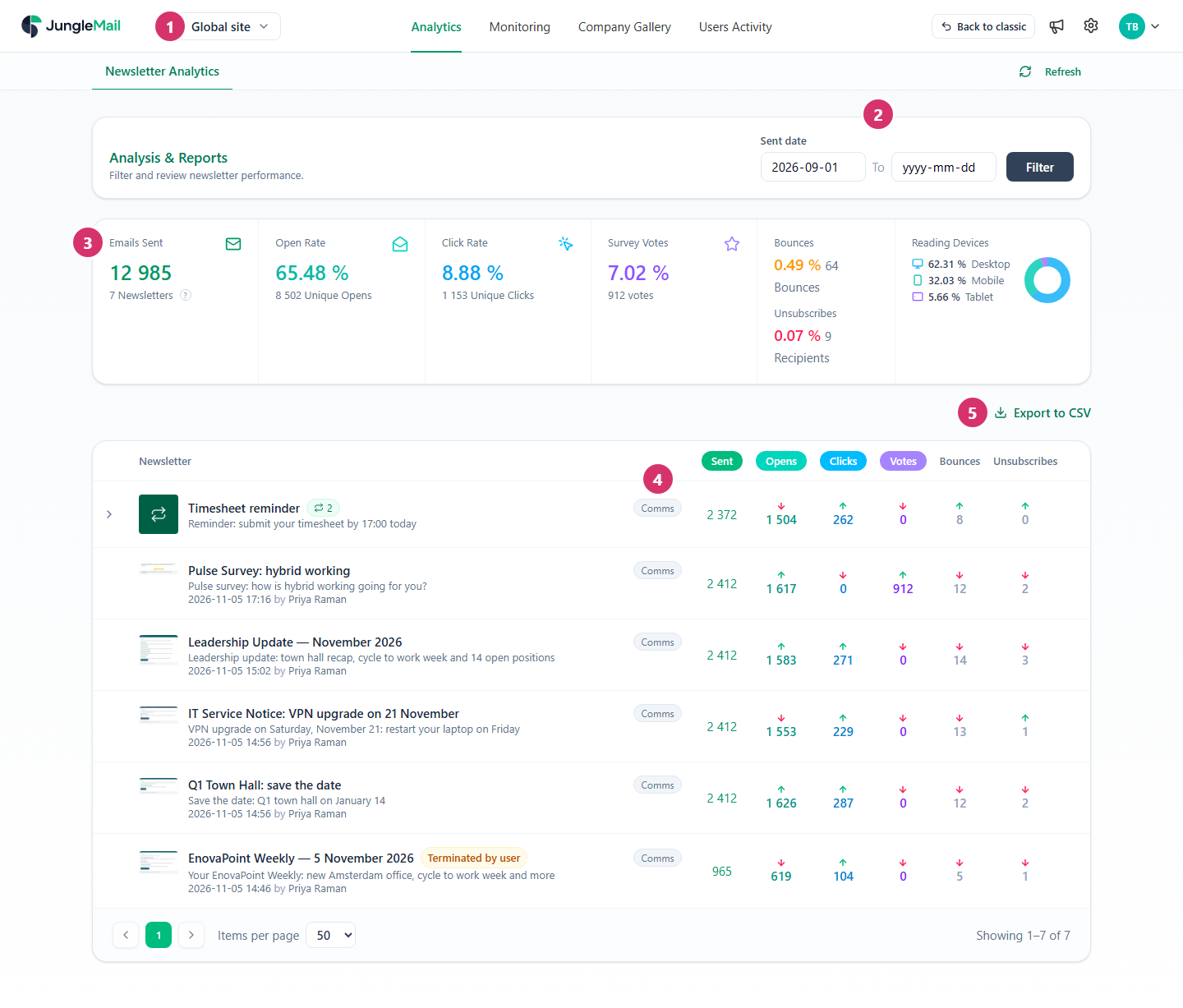
- Check that the site list shows Global site. The top menu has the Global site’s pages: Analytics, Monitoring, Company Gallery and Users Activity.
- To change the period, choose the first and the last day in Sent date, then select Filter.
- Read the totals of the newsletters listed, from all sites: emails sent, open rate, click rate, survey votes, bounces, unsubscribes and devices.
- Find the site each newsletter came from beside its name, such as Comms. Select a figure in the table to switch every row between counts and rates; compare sites in rates, since a company-wide newsletter and a team update reach very different numbers of people. Select a name to open the newsletter’s report (Read a newsletter report).
- To keep the list, select Export to CSV.
What is different on the Global site
Section titled “What is different on the Global site”The Global site shows results but sends nothing itself, so its Analytics page does less than a site’s own:
- There is no Search newsletter, Category or Hide test newsletters, so test newsletters are listed too. Categories and test marks are set on each newsletter’s own site.
- There are no Trends and Recipient Activity tabs.
- In a newsletter’s report, the lists of recipients have no links to their activity, and Follow up isn’t available.
The Global site’s dashboard sums up the last 30 days of all sites, and Monitoring follows the newsletters being sent from every site (Monitor newsletters across all sites).
- Give report readers the Report Viewer role. Someone who only reads results, such as EnovaPoint’s data analyst Mei Lin Tan, sees every site’s newsletters in Analytics and Monitoring without being made an Administrator of the Global site (The Global site).
- Ask editors to send trial newsletters to as few people as possible. The Global site lists test newsletters with the rest, so a trial sent to a large group weighs on the totals here even when its own site hides it.
- Agree on newsletter names across sites. With no Search newsletter or Category here, names that start with the newsletter’s series, such as Leadership Update — November 2026, are what lets you pick out one kind of newsletter in the list.
- Read a site’s own results on that site. For categories, test marks and Trends, switch to the site in the site list.