

Follow up on a previous newsletter
The Previous newsletter recipient source sends to the people who received a newsletter you sent before, or to some of them: those who opened it or clicked a link, or those who didn’t. Use it for a reminder to everyone who hasn’t registered for an event yet, or for a second message to those who showed interest. For a reminder about something to do, choose the people who didn’t click: a click is counted whenever someone selects a link, while an open is missed when the reader’s email program doesn’t load pictures.
Before you begin
Section titled “Before you begin”- Your organization has the Pro or Enterprise plan. On other plans the list of newsletters shows Not available in your edition. Please upgrade your plan.
- The newsletter you follow up on has finished sending, on the same JungleMail site.
Choose the newsletter and the group
Section titled “Choose the newsletter and the group”-
In the newsletter wizard’s Recipients step, open the list next to To and select Previous newsletter.
-
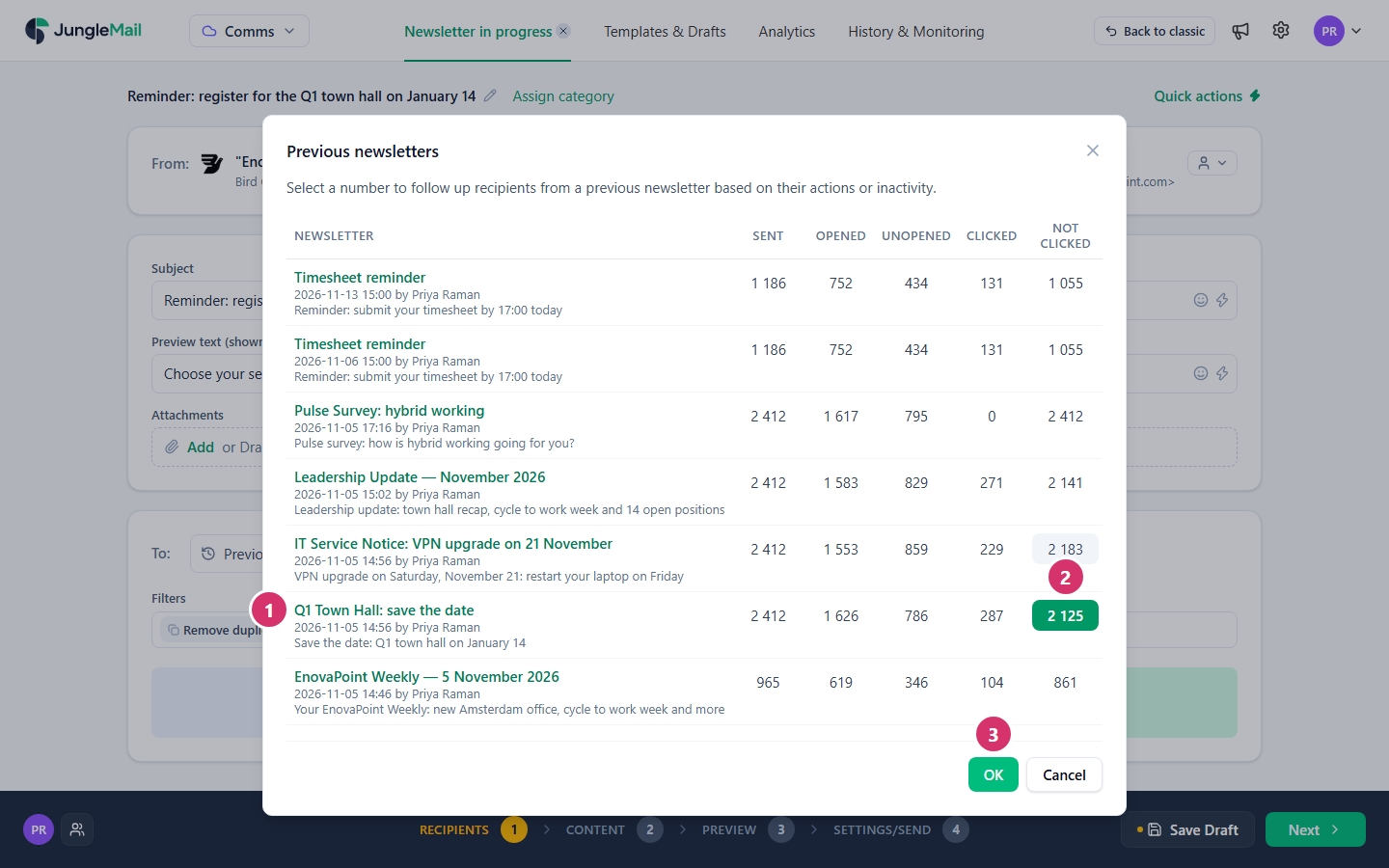
Select Select newsletter…. The Previous newsletters list opens.
-
Find the newsletter. Its columns count the people who were sent it, and those who did and didn’t open it or click a link in it: Sent, Opened, Unopened, Clicked and Not Clicked. Select a newsletter’s name to see it.
-
Select the number of the people you want to reach, and select OK. Here, Not Clicked of the town hall invitation reaches everyone who hasn’t clicked its link to register.
-
Check the To field: it shows the newsletter, the group you chose and how many of its recipients are in that group. The counts below show how many will receive the follow-up.
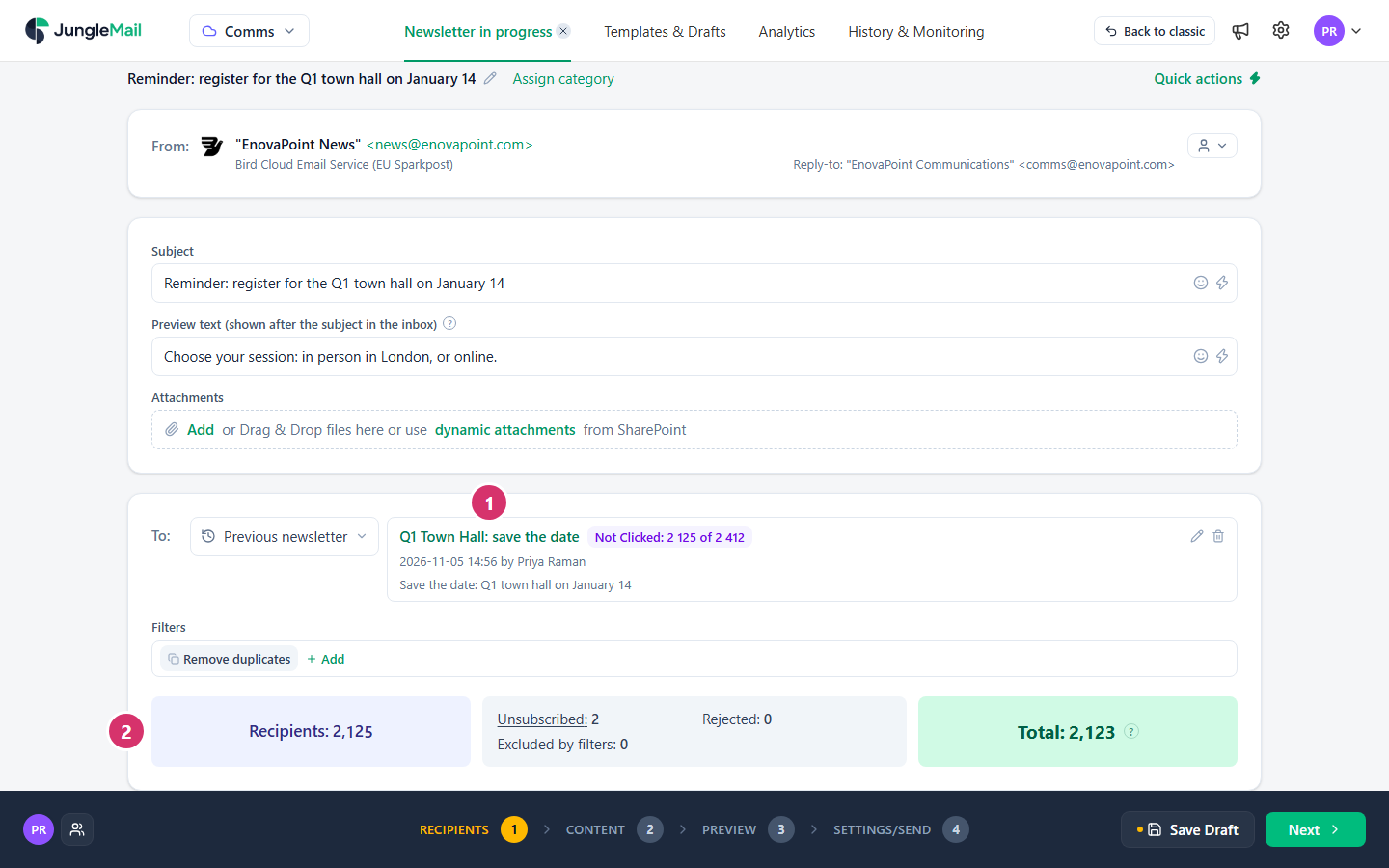
To choose another newsletter or group, select the pencil beside it; to remove it, select the bin.
Who gets the follow-up
Section titled “Who gets the follow-up”- JungleMail 365 takes the recipients from the earlier newsletter’s own source again, such as its groups or its file, and keeps the people in the group you chose. Someone who joined a group since then wasn’t sent the first newsletter and isn’t included; someone who left it isn’t included either.
- Merge tags work as they did in the earlier newsletter, because the recipients come from the same source.
- Remove duplicates is always on, and Additional recipients isn’t available.
- Unopened counts everyone JungleMail didn’t see open the newsletter. Opens are counted when the email’s images load or when the reader clicks a link, so people who read it with images blocked are counted as Unopened (How open and click tracking works).
- Newsletters whose analytics are pseudonymized aren’t listed: JungleMail doesn’t keep their readers’ addresses. The list then says Newsletters with pseudonymized analytics data are not listed because their recipients cannot be followed up.
You can also start a follow-up from a sent newsletter’s report: where it lists the people who opened or clicked, select Follow up > Follow up newsletter (See who opened or clicked). Choose it rather than Follow up emails, which keeps the addresses on the list as they are now.
- Schedule the follow-up for when it is needed. JungleMail works out who is in the group when the follow-up is sent, so people who register in the meantime aren’t reminded: schedule a town hall reminder for the day before registration closes (See who opened or clicked).
- Write it for people who may have read the first. Unopened includes people who read it with pictures blocked, and Not Clicked everyone who read it without selecting a link. Say what is new or still to do, with a subject of its own, such as “Town hall registration closes Friday”, rather than sending the same email again.
- Reach people who joined since with a copy of the first newsletter. The follow-up leaves them out. Copy the first newsletter, and leave out everyone who received it with the By newsletter filter (Filter recipients).