

Turn AI features on or off
The email builder’s AI assistants write, correct and translate text for editors, and create and edit pictures. The AI tab of a site’s settings decides whether editors see them, and which providers are switched on: OpenAI ChatGPT, Google Gemini and DeepL.
The assistants send what editors give them to the providers, outside JungleMail 365, so whether to turn them on is a question for your organization’s data policy, provider by provider (What each provider receives). A policy may accept DeepL in Germany and not OpenAI in the United States: EnovaPoint, for example, could switch on DeepL alone, so that the Amsterdam office gets newsletters in Dutch while drafts never reach a chat provider.
Before you begin
Section titled “Before you begin”- You need the Administrator role on the site, or a role with Manage Settings.
- While Inherit from global settings is on, the site follows the global settings. Leave it on if they already carry your organization’s AI policy; a global administrator can also lock the sites’ settings, so that no site switches on a provider the policy rules out (Global settings and inheritance).
Turn the assistants on or off
Section titled “Turn the assistants on or off”Go to Settings > Settings > AI.
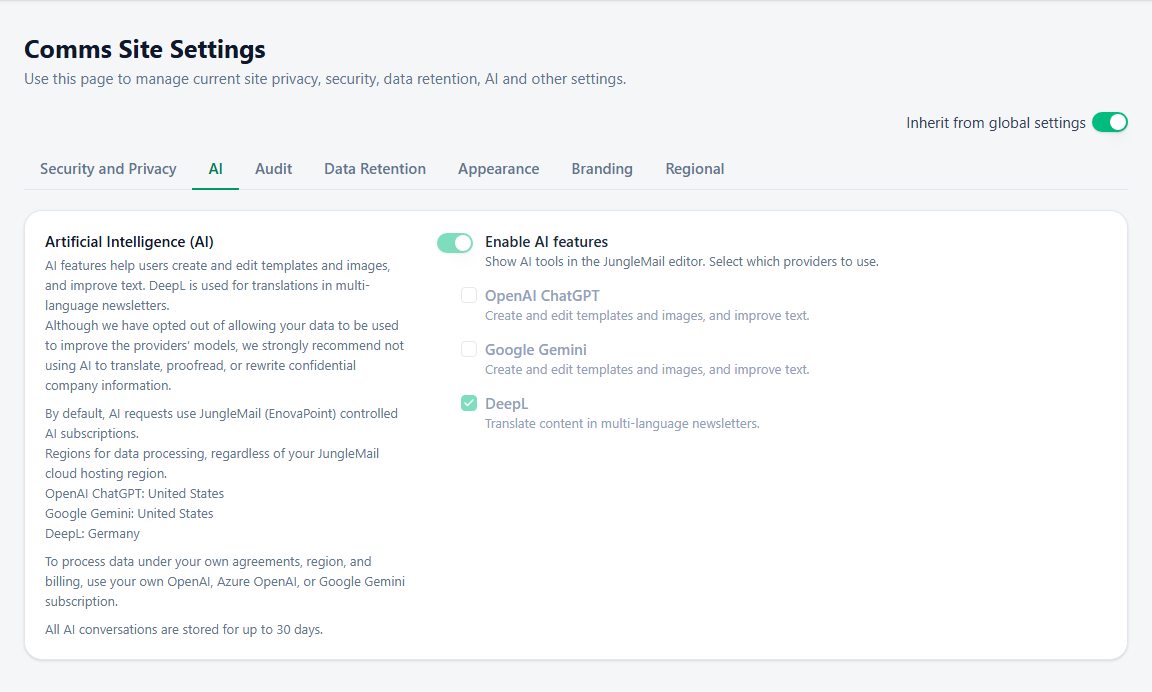
- Enable AI features shows or hides the AI tools in the editor. The providers can be switched on only while it is on: turn it off if your policy allows none of them.
- OpenAI ChatGPT creates and edits templates and pictures, and improves text. It uses JungleMail subscription (default). Choose Own subscription, with its API base URL and API key, when your policy needs the processing under your organization’s own agreement with the provider, or in a particular region. A standard Azure OpenAI deployment, for example, processes prompts within the geography you chose for it, doesn’t make them available to OpenAI, and doesn’t use them to train models (Data, privacy, and security for Foundry Models sold by Azure in Microsoft Foundry). Your IT team creates the resource and gives you its URL and key.
- Google Gemini: the same, with Own subscription and an API key. Switch it on only if your policy accepts Google as well as OpenAI; editors then choose between the two in the assistant.
- DeepL translates content in multilingual newsletters. To allow translations only, turn on Enable AI features and select DeepL alone.
Then select Save. A provider your plan or cloud doesn’t offer isn’t listed. Choosing JungleMail subscription (default) again for a provider deletes its saved key when you save.
What each provider receives
Section titled “What each provider receives”| Provider | What editors send it | Processed by |
|---|---|---|
| OpenAI ChatGPT | What they type into the AI chat, the files and links they attach, the email or the parts they select, and the pictures they edit with AI | OpenAI, in the United States, whatever your cloud; or your own OpenAI or Azure OpenAI subscription |
| Google Gemini | The same, when they choose Google Gemini | Google, in the United States; or your own Google Gemini subscription |
| DeepL | The subject, the preview text and the text of Title, Text and Button blocks they translate | DeepL, in Germany |
None of the providers keeps what it receives or trains on it. JungleMail itself keeps each editor’s AI chats for 30 days after they last use them, so that editors can return to recent chats, then deletes them (Write and design with the AI assistant, Translate an email).
Avoid the assistants for confidential information all the same. Editors agree to a note on how their messages are processed before they first use the chat; give them your organization’s own rules too, such as no unannounced changes and no personal details of colleagues.