

Send from your own domain
Newsletters sent through Bird Cloud Email Service or the JungleMail mail server come from a JungleMail domain until
your own domain is authorized: @jmcloudpost.com for Bird Cloud Email Service, and a domain per cloud for
the JungleMail mail server (IP addresses and domains). Until
then, if a sending address uses your domain, JungleMail replaces the domain, and the site administrator sees From
address domain might be replaced with @jmcloudpost.com. Authorizing your domain takes a DKIM record in your DNS,
which EnovaPoint’s support gives you.
Newsletters sent through a Microsoft 365 sending account come from your own Exchange Online and don’t need this. For the JungleMail mail servers, do it first, before the first real newsletter: readers recognize your domain, and the DKIM signature is what lets newsletters from your domain pass DMARC at Exchange Online, Gmail or any other receiver.
Before you begin
Section titled “Before you begin”- You need to be able to add records to your domain’s DNS.
Authorize your domain
Section titled “Authorize your domain”-
Email support@enovapoint.com with the domain you want to send from, for example
enovapoint.com. -
Support replies with a DKIM record: its type, host name and value.
-
Add the record to your domain’s DNS exactly as given. Then look it up, in PowerShell, to check that it is where support expects it:
Resolve-DnsName -Name <host name> -Type <type><host name>and<type>are the record’s host name and type from support. If the lookup finds nothing, check that your DNS provider didn’t add your domain to the host name a second time. -
Tell support that the record is in place. Depending on your DNS provider, a new record can take up to 24 hours to be visible everywhere.
-
Support checks the record, finishes the authorization and confirms it by email.
The authorized domain then appears in JungleMail on Settings > Sending Accounts, under Sending Domains of the Bird Cloud Email Service account, as Active:
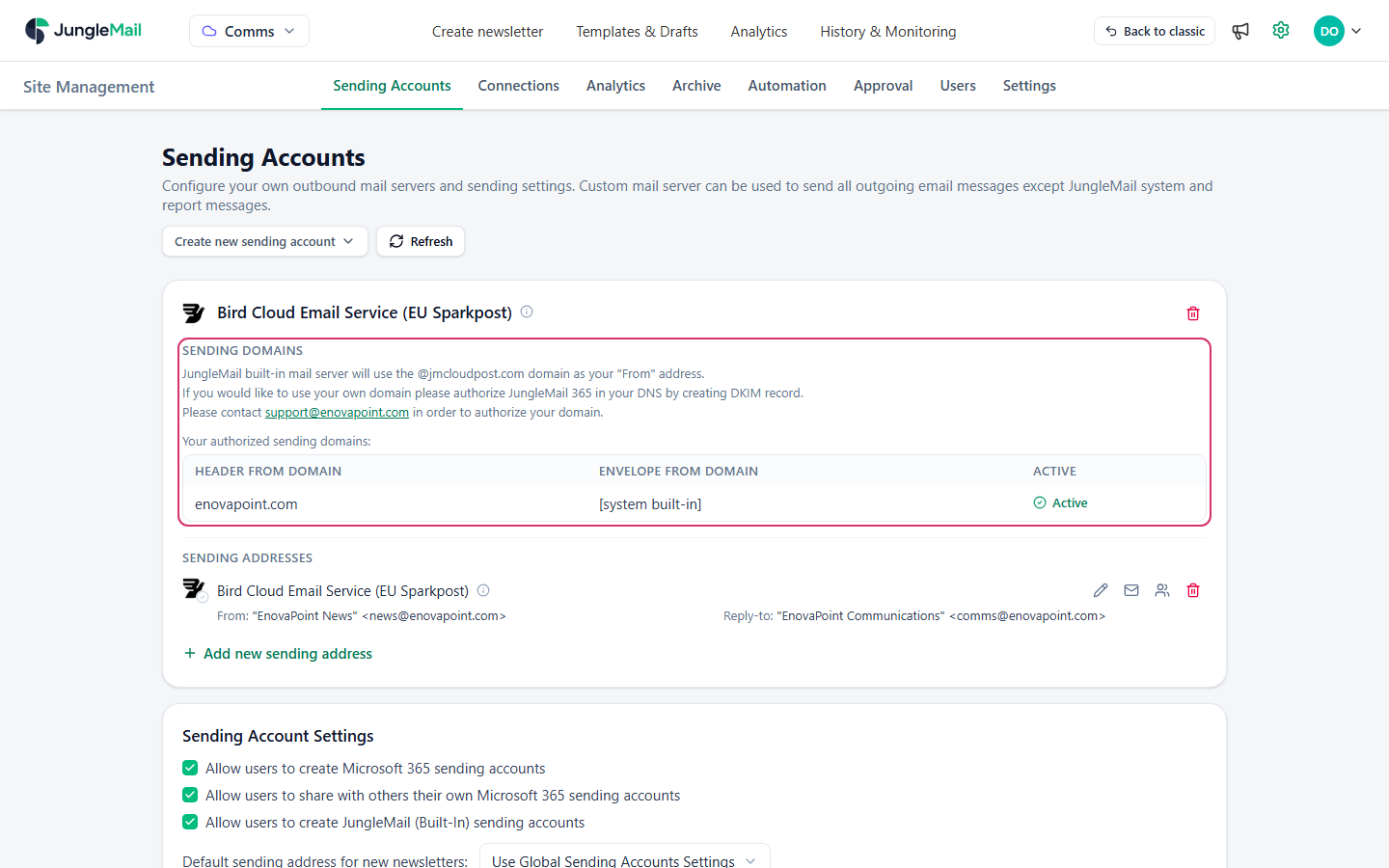
From then on, a site administrator can use the domain in a sending address’s From, for example
news@enovapoint.com (Add and manage sending addresses).
Your SPF record doesn’t need to change. The envelope sender is on a domain whose SPF EnovaPoint manages for the
JungleMail mail server, and Bird for Bird Cloud Email Service. To have SPF pass for your own domain
too, the envelope sender can be moved to a subdomain of yours, such as news.enovapoint.com: ask support for the
instructions.
If the newsletters go to people in your organization, also let them through your spam filter and keep Exchange from marking them as external.
How DMARC treats the newsletters
Section titled “How DMARC treats the newsletters”DMARC passes when either SPF or DKIM passes for a domain that matches the From address (Set up DMARC to validate email in Microsoft 365). SPF checks the envelope sender’s domain (Set up SPF to identify valid email sources for your Microsoft 365 domain), and while Envelope From Domain shows [system built-in], that domain is JungleMail’s, not yours. The DKIM signature on your domain is then what makes the newsletters pass DMARC, which Gmail and Yahoo require of bulk senders (Email sender guidelines, Sender Best Practices). With the envelope sender on a subdomain of yours, SPF passes for your domain as well, so DMARC doesn’t rest on DKIM alone.
- Check the result on a test. Once the domain is Active, have a site administrator send a test to a mailbox
you can open, and read its Authentication-Results header:
dkim=passwithheader.d=enovapoint.com, anddmarc=pass. Microsoft explains how to read the header in Set up DMARC to validate email in Microsoft 365. - Publish a DMARC record if your domain has none. Start with
p=noneand read the reports before you move toquarantineandreject, as Microsoft recommends: the reports show whether every service that sends as your domain, JungleMail included, passes. - Send from a subdomain if you prefer. Support can authorize a subdomain, such as
news.enovapoint.com, as well as your main domain, for any newsletter. Microsoft recommends a subdomain for bulk email services you don’t run, so that their reputation stays apart from your employees’ mail. With a subdomain, point Reply-to at a mailbox people read. - Record what the DKIM record is for. Note in your DNS documentation that it belongs to JungleMail. Removed in a DNS clean-up, it leaves newsletters unsigned, and a receiver that applies your DMARC policy then junks or rejects them.