

Manage your organization
A global administrator looks after JungleMail 365 for the whole organization: every JungleMail site, everyone who uses JungleMail and their user licenses, the permission roles, and the settings that apply to all sites. Each site also has its own administrators, who manage that site only (Manage a JungleMail site).
To open these pages, select Settings, the cog at the top right. The pages under Global Management are the global administrator’s.
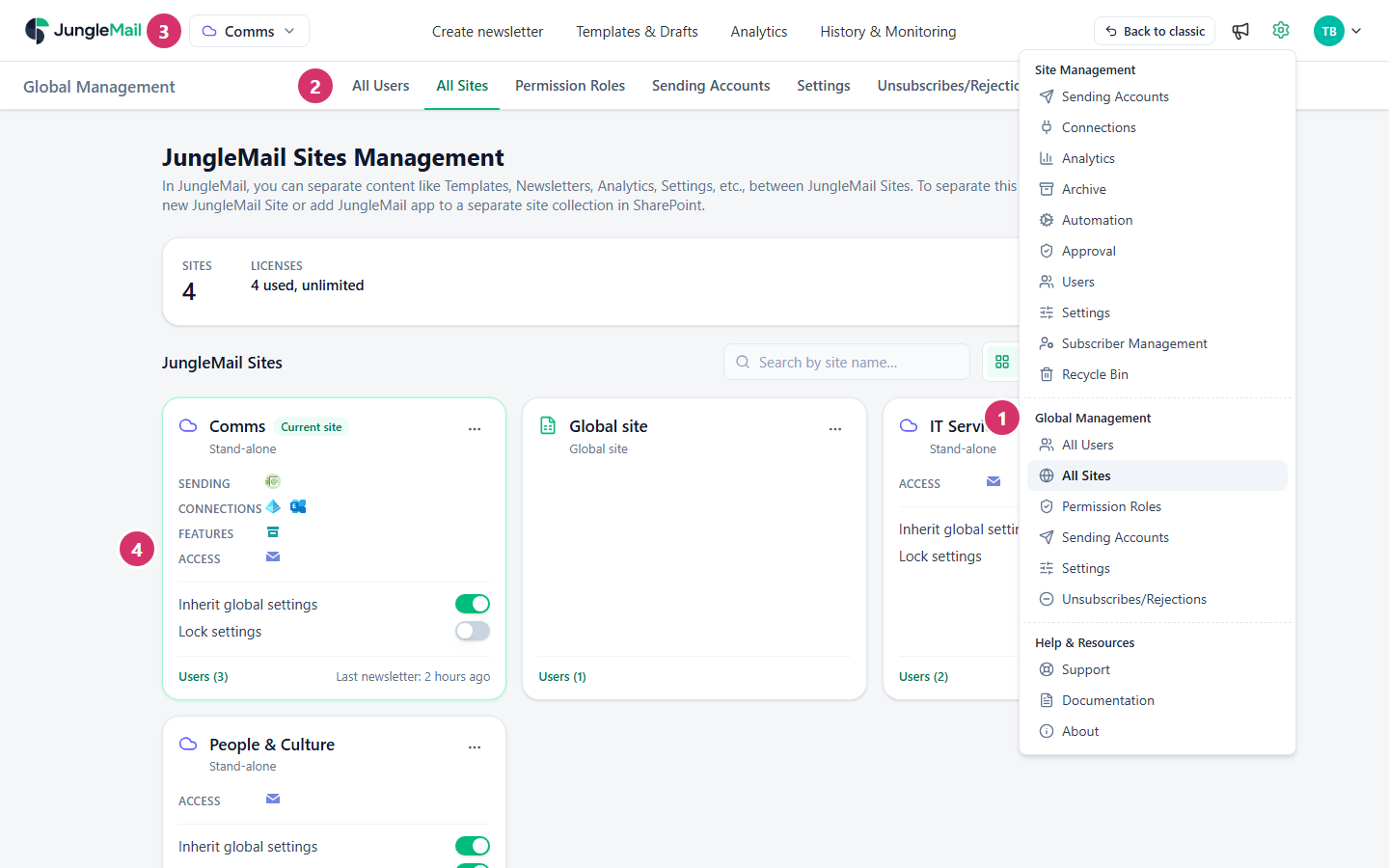
- Global Management in the Settings menu: one entry for each page.
- The same pages as tabs, to move from one to another.
- The site switcher: the JungleMail site you are working on. Manage sites, at the bottom of its list, opens All Sites.
- A site on All Sites: its type, what is set up on it, its users, and whether it follows the global settings.
Where to start
Section titled “Where to start”If JungleMail isn’t set up yet, follow Set up JungleMail for your organization. Then, as a new global administrator:
- Make a second global administrator, so that someone can always manage users, settings and the subscription (Global administrators).
- Decide who takes a license. Turn off Auto-join site without invitation on your first site, which starts with it on, and give people only the sites and roles they need (Manage users and licenses).
- Set your policies once. Put privacy, audit, retention and branding choices in the global settings, then create a site for each team that sends; new sites follow the global settings and are locked (Global settings and inheritance, Create and manage JungleMail sites).
The Global Management pages
Section titled “The Global Management pages”| Page | What you manage there |
|---|---|
| All Users | Everyone who uses JungleMail: their sites, their roles and their user licenses |
| All Sites | The JungleMail sites: create, rename, archive and delete them, and choose who belongs to each |
| Permission Roles | The roles that decide what people can do on a site |
| Sending Accounts | Sending accounts that every site can use, and the default sending address for new newsletters |
| Settings | Security, privacy, branding, regional and other settings for every site that inherits them |
| Unsubscribes/Rejections | Addresses that no site sends newsletters to |
Only global administrators can open these pages, except Unsubscribes/Rejections, which anyone whose role lets them view subscribers can open. A site administrator who opens one of the others sees Global administrator account is required to access the page. and can ask for access from there (Global administrators).
Your organization’s plan, usage and billing are in the Account menu instead: see Account and billing.
Roles and people
Section titled “Roles and people”Settings for every site
Section titled “Settings for every site”- Global settings and inheritance
- Restrict recipient sources, groups and domains
- Global sending accounts
- Manage unsubscribes and rejections