

Manage site users
The Users page, under Settings > Users, lists who can open a JungleMail site and their permission role on it, such as Administrator or Editor. As the site’s administrator, you add people who already use JungleMail 365, invite new people by email, and change or remove access. Users, licenses and roles for the whole organization are your global administrator’s (Manage users and licenses).
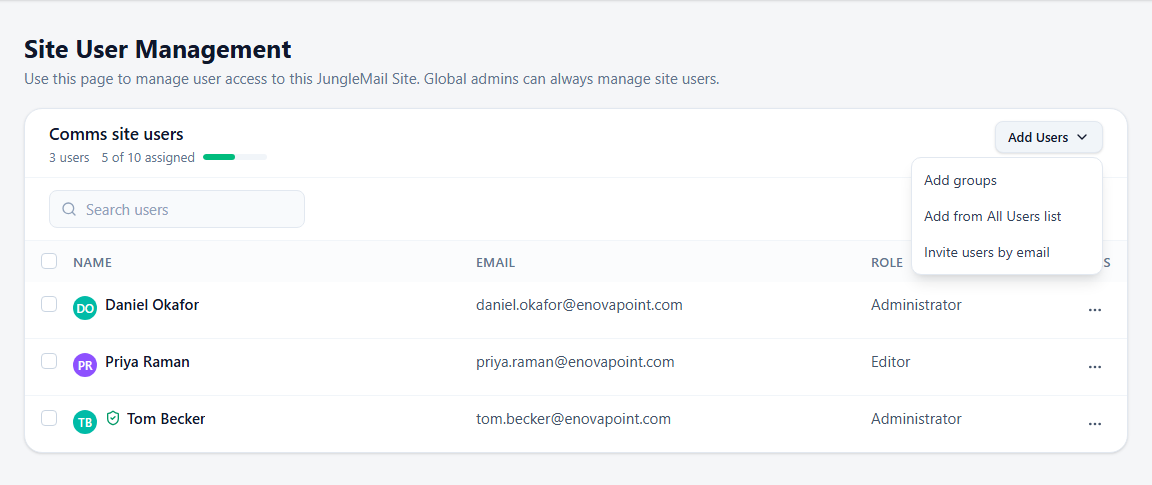
Give each person the least access that lets them do their job: Editor for those who write and send newsletters, Viewer for those who only follow the results, and Administrator for one or two people who look after the site. Administrators can change the sending accounts, connections and settings that every newsletter depends on; with two, someone can fix a sending account when the other is away. Where a whole team works on the site, let its group in rather than adding people one by one.
Before you begin
Section titled “Before you begin”- You need the Administrator role on the site, or a role with Manage site Users. View site Users shows the list without letting you change it.
- Everyone who uses JungleMail takes one of your organization’s licenses, however many sites they are on. The line under the list’s title shows how many are taken, such as 5 of 10 assigned.
Add someone who already uses JungleMail
Section titled “Add someone who already uses JungleMail”Select Add Users > Add from All Users list, select the person, choose their Permission Role, and select Add. When a built-in role gives more than someone needs, such as an editor who shouldn’t change templates, ask your global administrator for a role of your own, such as Newsletter Sender (Create permission roles).
Invite someone new
Section titled “Invite someone new”Add Users > Invite users by email invites people who have not used JungleMail yet: type their work addresses,
separated by commas, choose the Permission Role, and select Invite. The invitation comes from
no-reply@junglemail365.com, and they must sign in with the address you invited. It expires after 14 days; Resend
invite, under the person’s name, sends it again. JungleMail refuses an invitation, and says why, when someone already
uses JungleMail, here or in another JungleMail account of your organization, when an address isn’t in one of your
organization’s sign-in domains, or when there aren’t enough free licenses. If Invite users by email is missing,
your global administrator has turned off email invitations for the site.
If your global administrator lets anyone join the site, Allow new users outside the list below to join the JungleMail Site appears above the list. Turned on, it adds everyone in your organization who opens the site, with the role you choose, and someone who doesn’t use JungleMail yet takes a license. Leave it off unless the site is meant for everyone.
Let a group into the site
Section titled “Let a group into the site”Add Users > Add groups lets the members of Microsoft 365 or Entra ID groups into the site, with the permission role you choose. It needs the Microsoft Entra ID connection (Connect Microsoft Entra ID).
- Choose a group that holds exactly the people who work on the site, such as the communications team’s own group, rather than a large one: everyone in it can open the site, and each member who does takes a license.
- Every member gets the role, so give a group Editor or Viewer, and add administrators one by one.
A new team member then gets access when your IT team adds them to the group, and someone who leaves the group loses access, with their license freed, without anything to do here. Show users from groups shows the members in the list.
Change a role or remove someone
Section titled “Change a role or remove someone”Select … at the end of the person’s row, then Edit to choose another Permission Role, or Delete to remove them from the site. To change several people at once, select their rows and choose a role in Set role to… above the list.
Someone you remove keeps their JungleMail license and their access to other sites. When they leave JungleMail altogether, ask your global administrator to delete them under All Users, so that the license goes to someone else (Manage users and licenses). Global administrators, marked with a shield, can always manage the site’s users, whether or not they are on the list.