

"Approval required" when connecting a service
Symptoms
Section titled “Symptoms”You set up something in JungleMail 365 that signs in to Microsoft 365, such as a Microsoft 365 sending account or the Microsoft Entra ID, Exchange or SharePoint connection. Instead of finishing, Microsoft’s sign-in window shows one of these:
-
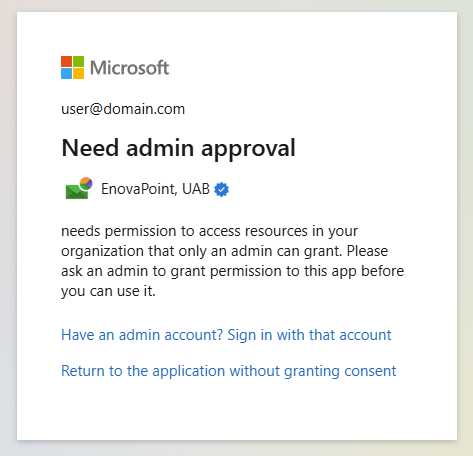
Need admin approval: the app “needs permission to access resources in your organization that only an admin can grant”, and you are asked to have an admin grant it.
-
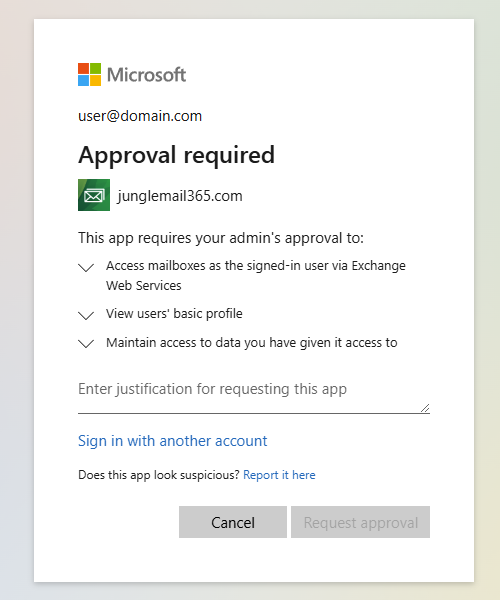
Approval required: “This app requires your admin’s approval to:” and a list of permissions, with a box for your reason, which turns on Request approval.
Back in JungleMail, the step stops, with a message such as Authorization was cancelled.
Each part of JungleMail that reads from or sends with Microsoft 365 is an application in your organization’s Microsoft Entra ID, and it needs your organization’s permission first. Your organization lets only administrators give that permission, or the permission is one that only an administrator can give, as for the Microsoft Entra ID connection. Microsoft offers to send them a request, Approval required, if your administrators turned admin consent requests on, and otherwise only tells you to ask them, Need admin approval.
Solution
Section titled “Solution”Ask a Microsoft 365 administrator who may grant consent for your organization. They can do one of these:
- Approve your request. If you selected Request approval, they review it in the Microsoft Entra admin center, under the enterprise applications’ admin consent requests, and approve it (Review admin consent requests). Then do the step in JungleMail again.
- Do the step themselves. They sign in to JungleMail and connect the service, accepting the permissions on behalf of your organization. After that, the people who use it don’t need to be asked again (Grant consent to JungleMail).
- Open the consent link. For the Microsoft Entra ID connection, select Copy consent link in its setup and send the link to them: they open it, accept, and don’t need to sign in to JungleMail (Connect Microsoft Entra ID).
Prevent it
Section titled “Prevent it”- Consent for every part, not only this one. Signing in, Microsoft 365 sending accounts and each connection are separate applications, and each asks the first time. When an administrator does the first setup of each one and consents on behalf of the organization, nobody is asked later (Grant consent to JungleMail). Plan the Microsoft Entra ID connection with a Global Administrator or Privileged Role Administrator for Application permissions; its delegated permissions can also be granted by a Cloud Application Administrator or Application Administrator.
- Turn on admin consent requests. Microsoft’s window then lets people send a request to the reviewers your administrators chose, instead of only telling them to ask an administrator (Configure the admin consent workflow).
If that does not help
Section titled “If that does not help”- If you still get the message after consent was granted, the application may be closed to you: in the Microsoft Entra admin center, its properties must allow users to sign in, and either not require assignment or have you assigned to it (Manage JungleMail’s applications in Entra ID).
- If your browser blocked the Microsoft window, JungleMail says so, such as Your browser blocked the authorization window. Allow pop-ups for this site and try again. Allow pop-ups for JungleMail’s address, and try again.
- Otherwise, contact support with what you were setting up and the time it happened (Get help from support).